WELCOME TO VIKRAMADITYA’S WORKSHOP
Hey welcome to my website Vikramaditya’s workshop. Today we will talk about some specific facts about the computers .
1) Did you know that the computers were only made for calculating purposes.
EARLY COMPUTER INVENTORS.
1) ‘CHARLES BABBAGE’ , A BRITISH MATHEMATICIAN , AND IS CONSIDERED AS THE FATHER OF COMPUTERS .
2) HE INVENTED A WORKING MODEL OF THE MECHANICAL COMPUTER CALLED THE DIFFERENCE ENGINE IN 1822 AND THE ANALYTIC ENGINE IN 1833.
3) THE ANALYTIC ENGINEHAD 5 INPUT UNITS-INPUT, OUTPUT,STORE,MILL AND CONTROL .
1) ” AUGUSTA ADA LOVELACE ” , WAS AN ENGLISH MATHEMATICIAN AND WRITER.SHE IS CHEIFLY KNOWN FOR HER WORK ON CHARLES BABBAGE’S ANALYTIC ENGINE SHE IS CONSIDERED AS THE FIRST
PROGRAMMER WHO SUGGESTED BINARY DATA STORAGE ( 0 AND 1 ) INSTEAD OF DECIMAL NUMBER SYSTEM.
1) GEORGE BOOLE
GEORGE BOOLE WAS AN ENGLISH MATHEMATICIAN. HE REALISED THAT COMPLEX
MATHEMATICIAL PROBLEMS COULD BE SOLVED BY REDUCING THEM TO THE SERIES OF QUESTIONS , HAVING EITHER POSITIVE OR NEGATIVE ANSWERS. HE LINKED THEM WITH THE BINARY NUMBER SYSTEM AND REPRESENTIVE THE POSITIVE RESULTS BY 1 AND THE NEGATIVE RESULTS BY 0.THIS THEORY of BOOLEAN LOGIC BECAME FUNDAMENTAL PRINCIPAL FOR THE DESIGN OF COMPUTER CIRCURITRY.
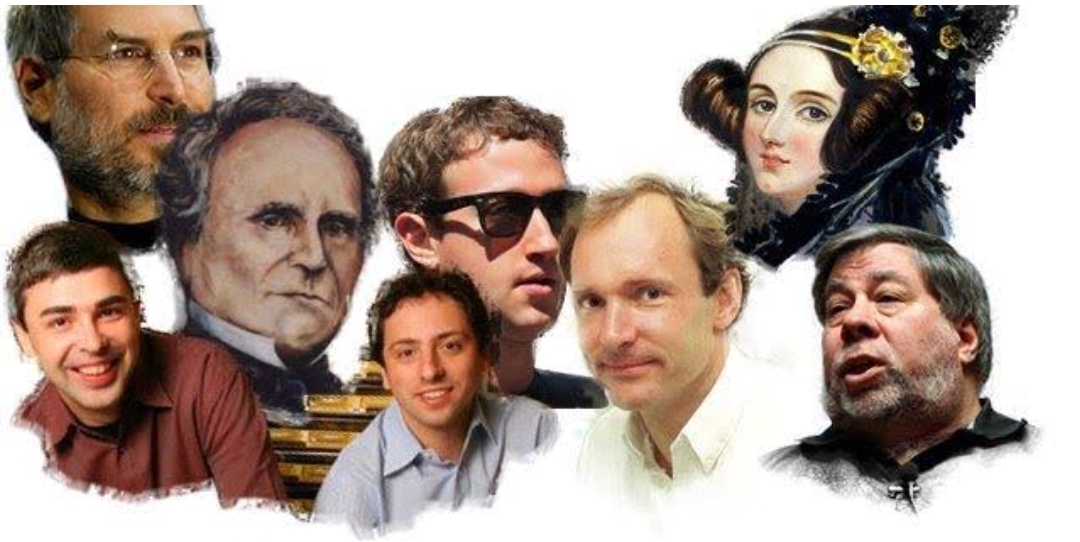
COMPUTER SCIENTISTS.
ABOUT COMPUTERS
A computer is a machine that can be programmed to carry out sequences of arithmetic or logical operations automatically. Modern computers can perform generic sets of operations known as programs. These programs enable computers to perform a wide range of tasks.
20 FACTS ABOUT COMPUTERS
The First Computer Weighed More Than 27 Tons
1) Her name was ENIAC, and she took up a modest 1800 square feet of space.
About 90% of the World’s Currency Only Exists on Computers
2) This means only about 10% of the global currency is actually cash.
About 70% of Virus Engineers Work for Organized Crime Syndicates
3) This gives new weight to the importance of anti-virus and anti-malware software, and excellent virus removal services.
The First Computer Mouse was Made of Wood
4) Doug Engelbart invented it in 1964.
The First Known Computer Programmer was a Woman
5) Her name was Ada Lovelace, and she lived in England, where she worked as a mathematician and writer. She is famous for working on the “Analytical Engine.”
Some of the Biggest Computer Brands Started in Garages
6) This is true for Apple, Microsoft, and HP.
People Blink Less When They Use Computers
7) While the average person blinks about 20 times a minute under normal circumstances, people on computers only blink about seven times a minute.
Hackers Write About 6,000 New Viruses Each Month
8) These viruses are designed to target a wide selection of operating systems, so learning to avoid viruses and malware is essential!
More Than 80% of Daily Emails in the U.S. are Spam
9) To keep your data safe, delete these emails immediately and don’t click any links or attachments they might contain.
MyDoom is the Most Expensive Computer Virus in History
10) The virus cost an estimated $38.5 billion in damage and came about in January of 2006. Shortly after that, it earned a name for itself as the fastest-spreading virus ever.
The Parts for the Modern Computer Were First Invented in 1833
11) A man named Charles Babbage put them together, but the first modern computer came about 120 years later.
The First Gigabyte Drive Cost $40,000
12) It was released in 1980 and weighed 550 lbs. How’s that for a portable drive?
The Case of the First Macintosh Computer Includes 47 Signatures
13) On the inside of the device, Macintosh’s entire 1982 division signed the case.
The Worst U.S. Security Breach of All Time Happened Because of a USB Stick
14) Someone found the stick (which a foreign intelligence agency infected) in a parking lot and plugged it into their computer. The computer had links to the U.S. Central Command. The attack happened in 2008 and resulted in the theft of thousands of classified and unclassified documents. The Pentagon spent about 14 months cleaning up the damage from the worm.
A Single Computer Catches 50% of all Wikipedia Vandalism
15) This computer has a 90% accuracy rate.
Computers Sort 95% of Mail
16) The U.S. Postal Service still hires individual employees to sort through addresses that are too sloppy for computers to make sense of.
MIT Has Computers That can Detect Fake Smiles
17) These computers can tell between genuine smiles and frustrated smiles.
Computers Might Soon be Able to Tell What Dogs Think
18) These computers are under development by a Scandinavian company. A prototype is purported to be available.
Russia Engineered a Computer That Ran on Water
19) The computer was built in 1936 and was meant to solve partial differential equations.
Disney Fired John Lasseter for Pushing Computer Animation
20) He’s now the CCO of Pixar.
Windows Tips and Computer Tricks
1. Focus Assist to Minimize Interruptions
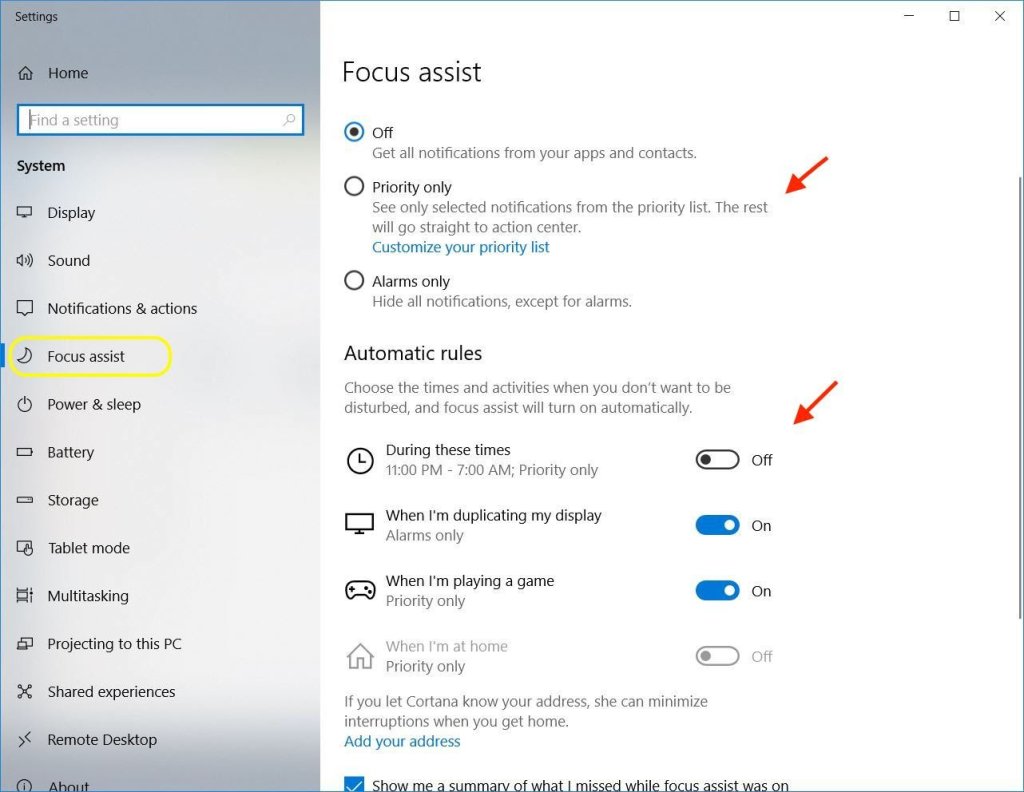
You can customize its settings by going into Start, Settings, System and then click on Focus assist (or just search for it). This area will allow you to set priorities and create rules – for things such as setting timeframes that you wish not to be disturbed.
2.Pin Contacts to the Taskbar
You probably knew that you can pin many things to the Windows 10 taskbar. Did you know one of these is an easy way to access your favorite contacts?
To do so, click on the People icon on the taskbar and choose the Get Started button. This will bring up options for selecting contacts to pin – using email or Skyp
3. Game Screen Recorder
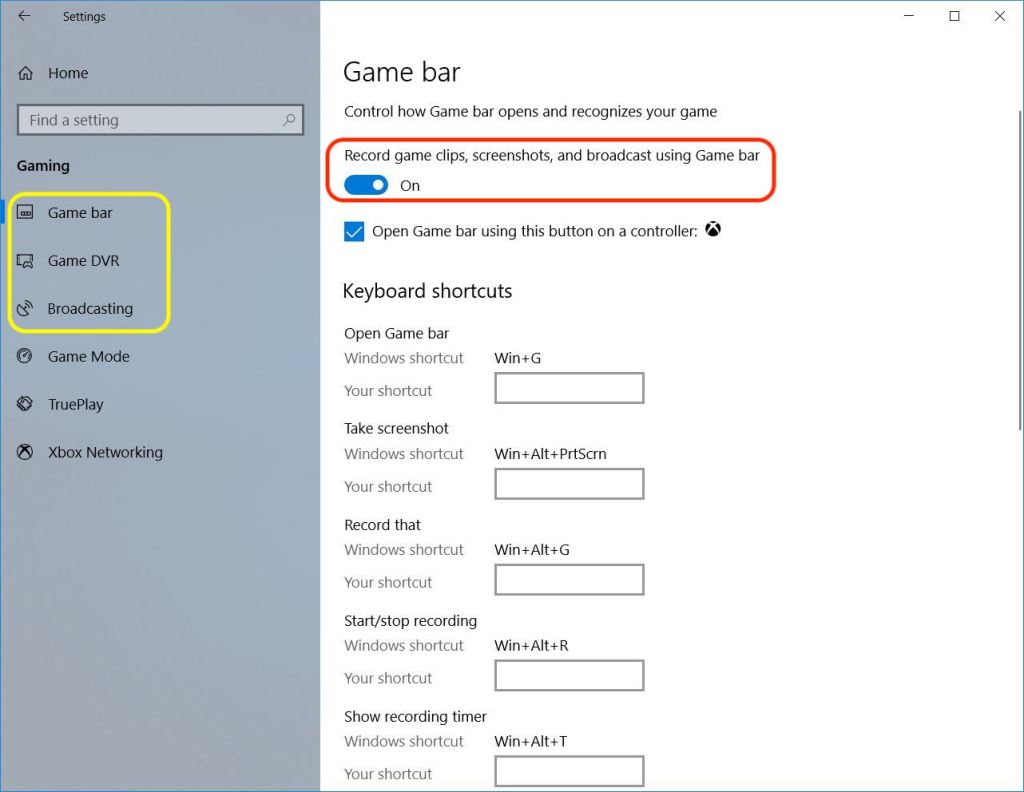
Meant to be used as a way to record gaming sessions, this hidden recording tool can also be used to record other activities/applications. You can create a how-to video for posting on a blog video, an easy way to send someone instructions and so on.
Access the Game Bar (Windows key + G) and click on the red button to start recording.
4. Optional Start Menu
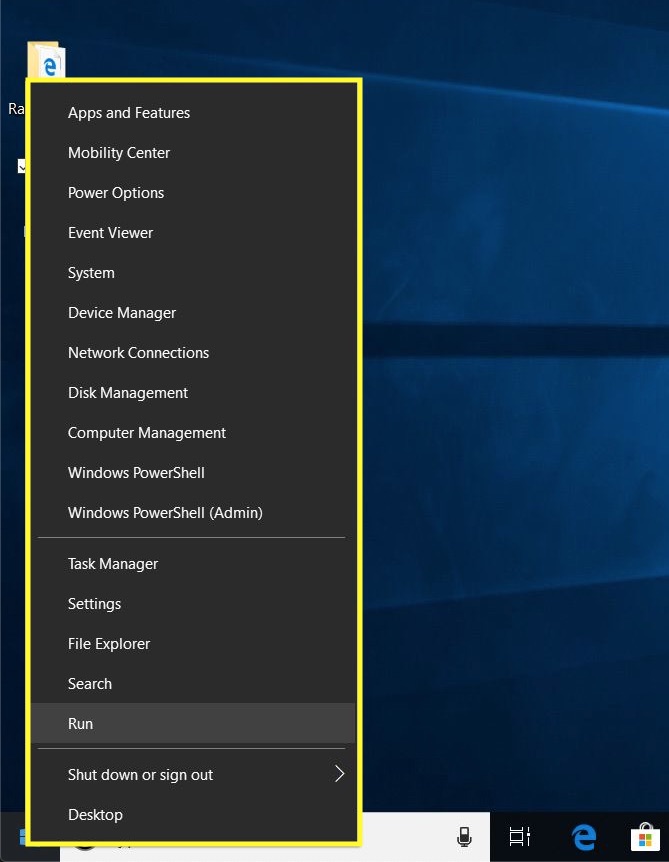
For those who still hold the older versions of Windows (Windows 7 mostly) with some degree of nostalgia, there is a way to quickly produce a Start menu that (somewhat) resembles those past ones.
To bring it up (instead of the normal Start menu) right-click the Start button.
It will show a menu of items more familiar to seasoned Windows users. This is an easy way to bring up such items as the Run command or Task Manager.
5. Hidden Show Desktop Button
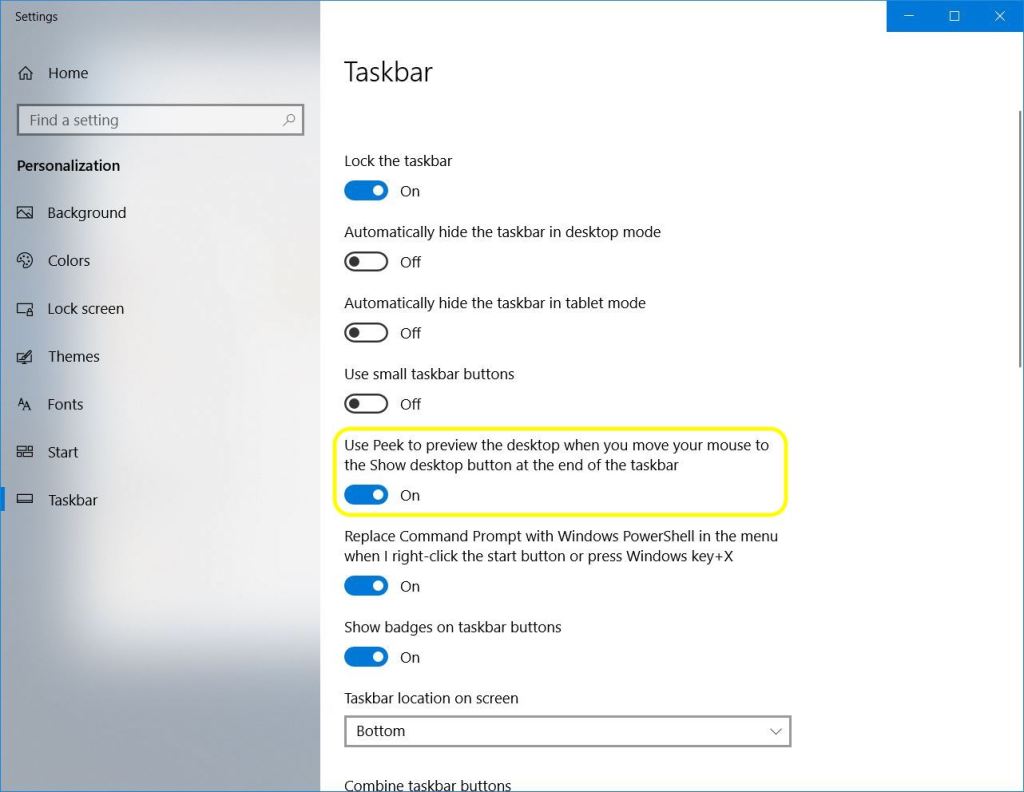
The show desktop button is situated on the far right side of the Windows taskbar. It’s thin, so finding it isn’t exactly intuitive. Once you do click on it, all open windows will be minimized to reveal the desktop.
There’s also a peek feature you can enable by right-clicking on the taskbar and choosing Taskbar settings. Once the option is turned on, you can hover your mouse over that small area/button to give a preview of the desktop.
6. Screen Capture Tools
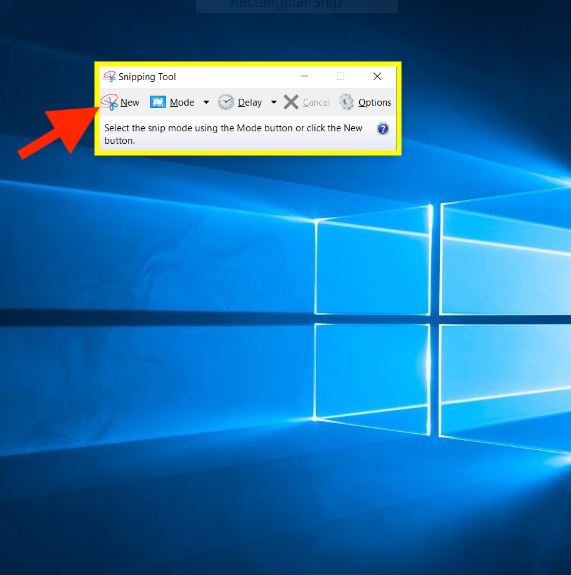
Still, there is hope for the Windows user. One (built-in) tool is called simply Snipping Tool, has a mode that allows the dragging of a box to capture items (similar to the aforementioned Mac features) and one for entire window screenshots.
Snip & Sketch is another tool for grabbing screenshots. In order to use it, you may need to download it from the Microsoft Store first. Once done, you can use a hotkey (Windows key + Shift + S) to drag a box around what you wish to capture.
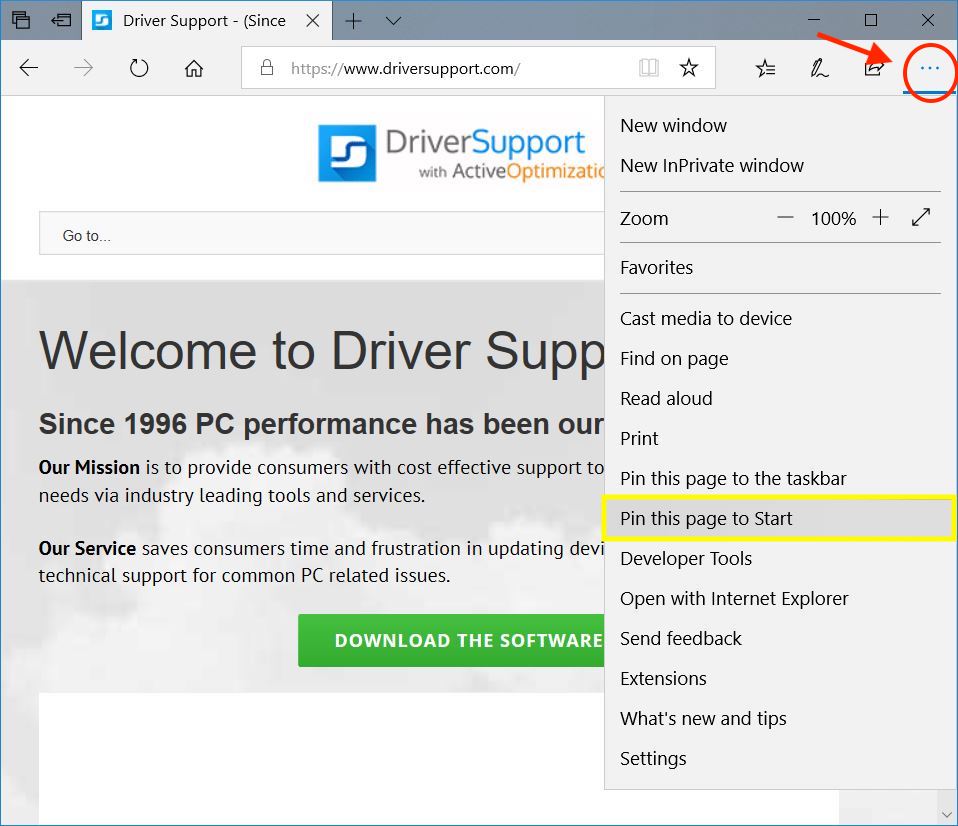
7. Save Websites to the Start Menu

The Windows 10 Start Menu can be customized to easily find what you’re looking for.
While you may already be accustomed to moving around tiles and changing their size, there is another item you can add that isn’t an application – a favorite website.
SOME INFORMATION ABOUT COMPUTERS
A computer is a machine that can be programmed to carry out sequences of arithmetic or logical operations automatically. Modern computers can perform generic sets of operations known as programs. These programs enable computers to perform a wide range of tasks. A computer system is a “complete” computer that includes the hardware, operating system (main software), and peripheral equipment needed and used for “full” operation. This term may also refer to a group of computers that are linked and function together, such as a computer network or computer cluster.
 Vikramadityas workshop